
Introduction
In today’s information-rich digital landscape, researchers, academics, and product professionals face a persistent challenge: transforming fleeting web discoveries into lasting, actionable knowledge. The typical research workflow—jumping between browser tabs, copying snippets into separate documents, and struggling to maintain context—creates friction that diminishes both productivity and insight quality.
This case study explores how Visual Paradigm FREE Annotator redefines the web research experience by enabling users to capture, organize, and synthesize findings directly within their browser. By examining its core capabilities, collaborative features, and practical implementation workflow, we demonstrate how this tool bridges the gap between passive consumption and active knowledge management, ultimately empowering teams to build more coherent, traceable, and impactful research outcomes.
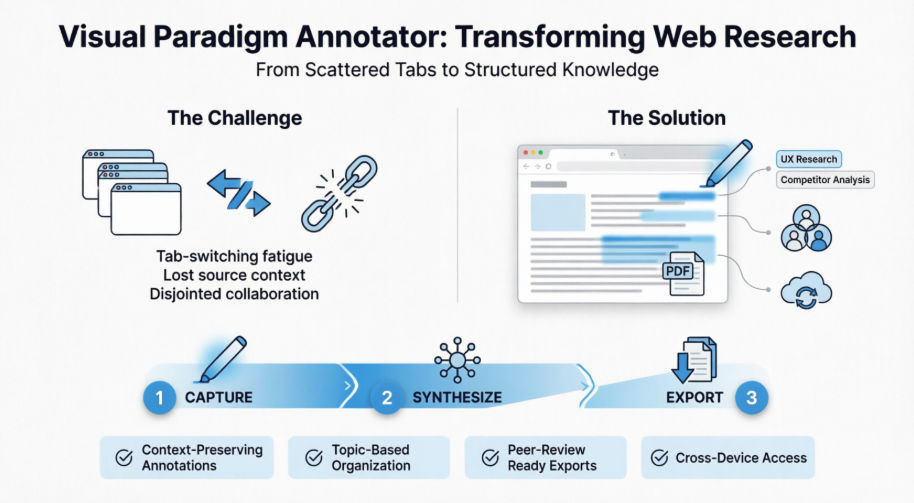
The Research Challenge: Fragmentation in the Digital Age
Modern web research is inherently fragmented. Professionals often find themselves:
- Losing context when copying content from source pages to note-taking apps
- Struggling to reconnect insights with their original sources weeks later
- Managing collaboration through disjointed channels like email threads and screenshot exchanges
- Wasting time switching between tools instead of focusing on analysis
This fragmentation not only slows down workflows but also compromises the depth and reliability of research outputs. A solution was needed—one that keeps annotations anchored to their source context while supporting organization, collaboration, and export.
Introducing Visual Paradigm Annotator: Active Learning & Collaboration
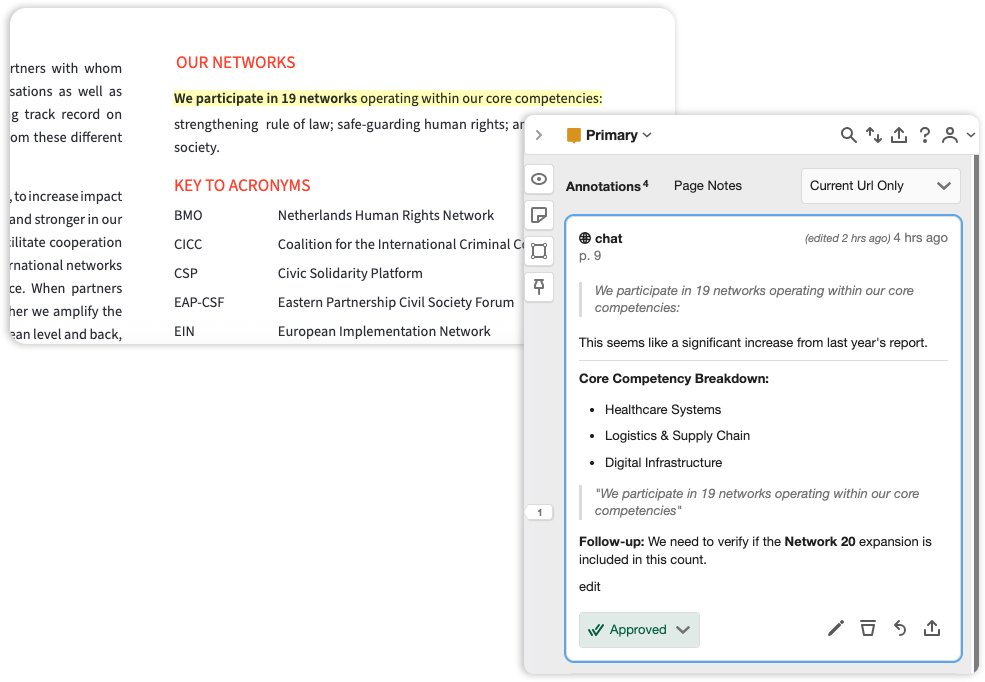
Visual Paradigm Annotator is a browser extension designed to streamline qualitative research and data collection. It allows users to highlight, comment on, and organize information directly from live websites without leaving the browser. The tool transforms static web pages into living, interactive documents where knowledge can be captured, connected, and refined in real time.
Designed for Serious Research, Not Just Reading
While basic highlighters allow you to mark text, Annotator is built for the rigorous process of knowledge management. We help you move from scattered browser tabs to a centralized research library.

Deep Knowledge Retention
Our system forces active processing, ensuring you don’t just ‘see’ data, but understand it.

Topic-Based Organization
Group findings from different sources into unified research collections.

Peer-Review Ready
Export your annotations directly into JSON, plain text, CSV, and HTML.
Powerful Features for Knowledge Seekers
Everything you need to gather, retain, and share your research findings in one place.
Smart Highlighting
Highlight text on any website or PDF. Your marks stay there, even if you refresh the page or return months later.
Semantic Tagging
Organize your findings with a powerful tagging system. Cross-reference data points across multiple websites effortlessly.
Threaded Collaboration
Invite colleagues to your private research group. Discuss findings directly on the source page without switching apps.
Private Collections
Keep your sensitive research data encrypted and private. Only share what you want, when you want.
PDF Annotation
Full support for local and online PDFs. Treat digital documents with the same fluidity as physical paper.
Access Anywhere
Access your annotations from any device, anytime. Your research library follows you from office to home.
Three Steps to Better Research
 Capture
Install the extension and start highlighting text on any webpage or document.
 Synthesize
Add notes, tags, and cross-references to build a cohesive map of knowledge.
 Export
Export your findings into JSON, plain text, CSV, or HTML.
Addressing the Challenge of Disconnected Research
For too long, web research has been a fragmented process. Users typically find information on one tab and are forced to copy-paste it into another tool or document to save their thoughts. This “tab-switching” leads to a loss of context, where the original source of an idea becomes difficult to trace weeks later.
Furthermore, collaborating on web-based content—like giving feedback on a design prototype or a technical wiki—often involves messy email chains or screenshots that quickly become outdated. There hasn’t been a unified generator of collaborative feedback that lives where the content does.
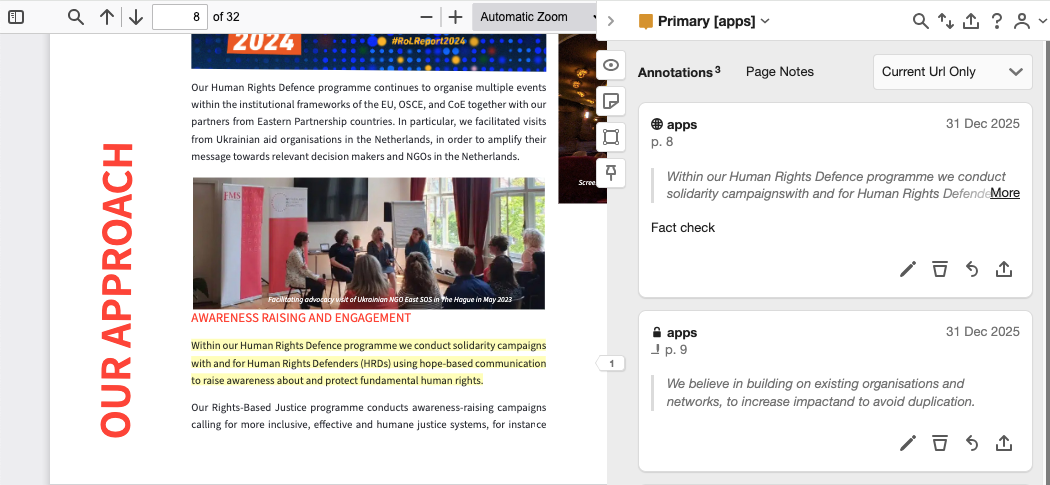
Introducing Visual Paradigm Annotator: Active Learning & Collaboration
The Visual Paradigm Annotator was built to solve these friction points by making the web interactive. It serves as a centralized tool for individuals and teams to capture ideas in real-time. By keeping your notes “anchored” to the specific sentences they refer to, you never lose the “why” behind your research.
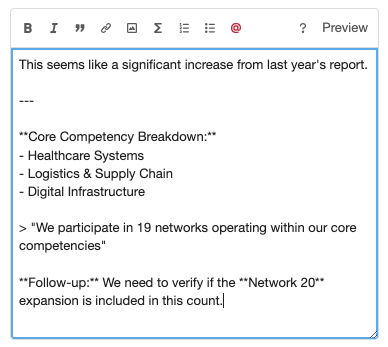
- Contextual Annotation: Attach rich-text notes directly to specific paragraphs or images on any public website.
- Private Collaboration Groups: Create secure, invite-only spaces where your team can discuss web content privately.
- Smart Tagging System: Use this tool to categorize your findings with tags like #research or #todo for instant retrieval later.
- PDF Support: Annotate online PDFs just as easily as standard web pages, perfect for academic papers and reports.
- Integrated Ecosystem: Use your existing Visual Paradigm Online account for a seamless, single sign-on experience.
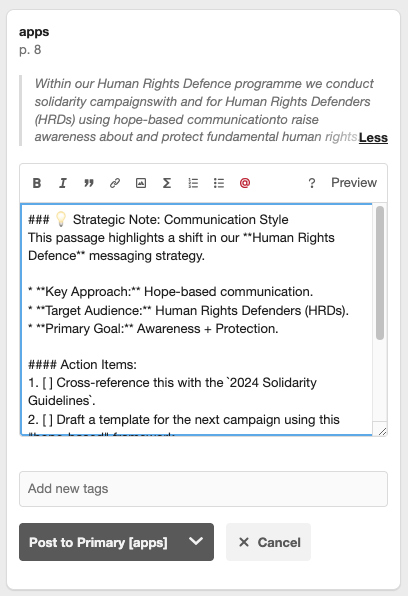
How to Access and Use the New Tool
The Visual Paradigm Annotator is available in the free edition of Visual Paradigm. You can access the tool directly through your browser to start building your knowledge base in just a few clicks using this simple workflow:
- Activate the Tool: Open the Annotator extension or sidebar while browsing any website or online PDF.
- Select and Highlight: Use your mouse to select any text. A popup will appear—click “Highlight” to save the snippet or “Annotate” to add a detailed note.
- Organize with Tags: Within the annotation box, add relevant tags to help this generator categorize your research for your dashboard.
- Collaborate: Change the visibility of your note to a “Group” scope to start a threaded discussion with invited colleagues or classmates.
Common Questions About the Annotator
Is Visual Paradigm Annotator free?
Yes, it is available as part of the free edition of Visual Paradigm, making it accessible for everyone to use.
How do I log in if I have a Visual Paradigm account?
Simply click “Log in” and choose the “Log in with Visual Paradigm Online” option. You will be redirected to the familiar login page to authenticate securely.
What if I don’t have a Visual Paradigm account?
You can easily create a free account to get started. This gives you access to the web annotator and other Visual Paradigm services.
Can others see my annotations?
It’s up to you. You can make annotations public, keep them private (“Only Me”), or share them with a select group in a private group.
What is a “Group”?
A group is a private space for collaboration. Annotations in a group are only visible to members, making it a perfect tool for team projects or client feedback.
How is this different from browser bookmarks?
Bookmarks save a link; the Annotator saves the interaction. This tool allows you to save specific highlights and notes directly on the page context.
Can I edit or delete my annotations?
Yes. You have full control. You can edit or delete your own annotations at any time using the icons in the sidebar.
Conclusion
Visual Paradigm Annotator represents a paradigm shift in how professionals engage with web-based information. By embedding annotation, organization, and collaboration directly into the browsing experience, it eliminates the friction of context-switching and preserves the critical link between insight and source. Whether you’re an academic synthesizing literature, a product manager conducting competitive analysis, or a research team collaborating on a complex project, Annotator transforms passive reading into an active, structured knowledge-building process. With its intuitive three-step workflow—Capture, Synthesize, Export—and robust features like semantic tagging, threaded discussions, and cross-device synchronization, the tool empowers users to build living research libraries that grow smarter over time. As the volume and velocity of digital information continue to accelerate, solutions like Visual Paradigm Annotator will be essential for turning the noise of the web into the signal of meaningful knowledge.
Ready to upgrade your research workflow? Join thousands of professional researchers, academics, and analysts who use Annotator to bridge the gap between discovery and knowledge.
Download for Chrome
Download for Firefox
References
- Master Web Research with Visual Paradigm Annotator: Official release announcement detailing the launch and core capabilities of Visual Paradigm Annotator, including feature highlights and integration guidance for researchers and teams.
- Visual Paradigm Annotator – AI-Powered Web & PDF Annotation Tool: Product landing page providing comprehensive overview of Annotator’s features, use cases, pricing, and download options for Chrome and Firefox browsers.